Quick Dimension
Read any size on screen, or get a full A3 drawing in seconds.Baca ukuran apa pun di layar, atau dapatkan gambar A3 lengkap dalam hitungan detik.
Free SketchUp extension · SketchUp 2021+ · VersionExtension SketchUp gratis · SketchUp 2021+ · Versi 1.7.7
Quick Dimension does two jobs. On screen: click any object or face and read its size straight away, with nothing added to your model. On paper: select your objects and Generate A3 Sheet builds a dimensioned drawing, ready to print as a PDF or to edit in LayOut.
Quick Dimension punya dua fungsi. Di layar: klik objek atau face dan langsung baca ukurannya, tanpa menambah apa pun ke model. Di kertas: pilih objek, lalu Generate A3 Sheet membuat gambar berdimensi, siap dicetak sebagai PDF atau diedit di LayOut.
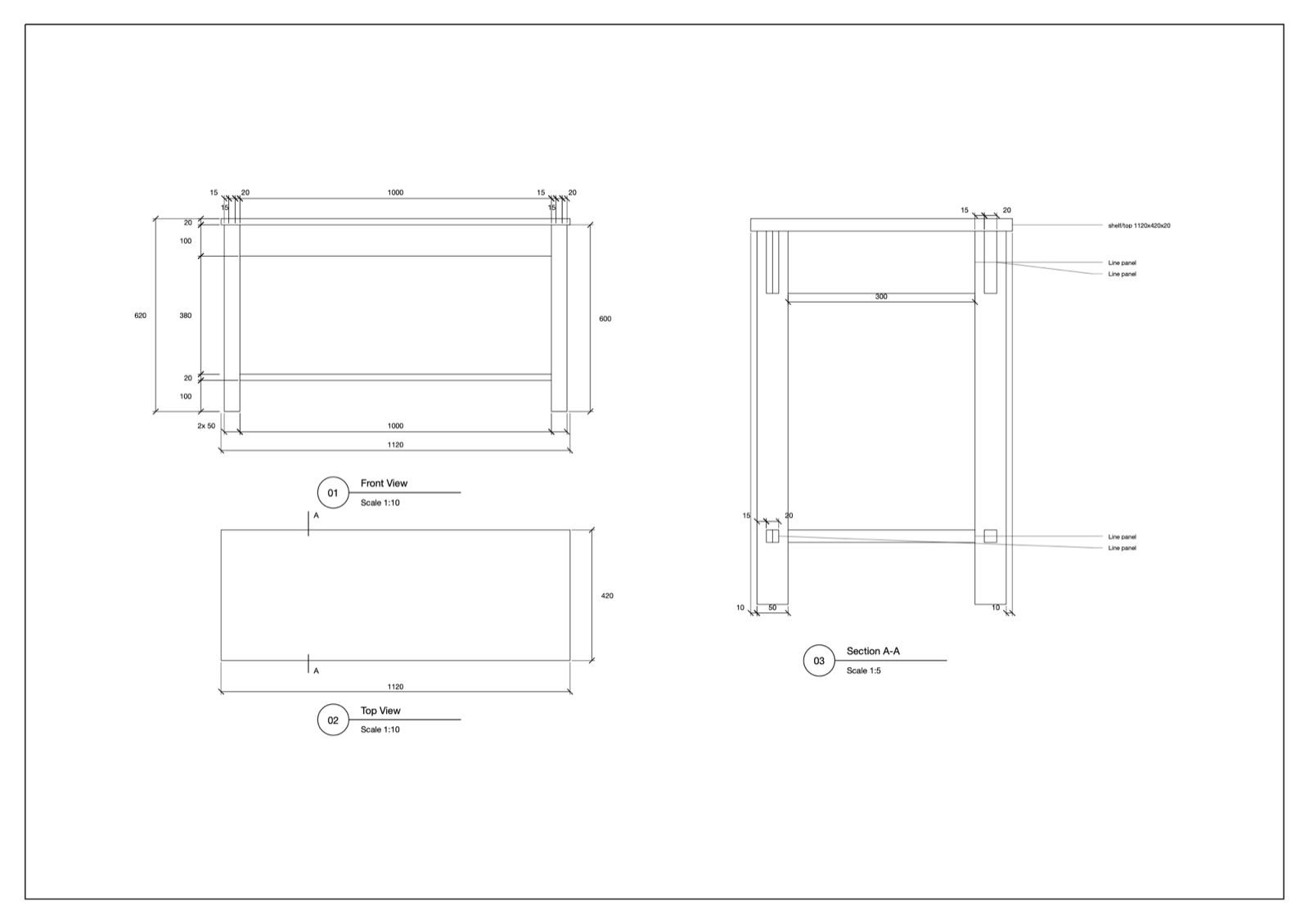
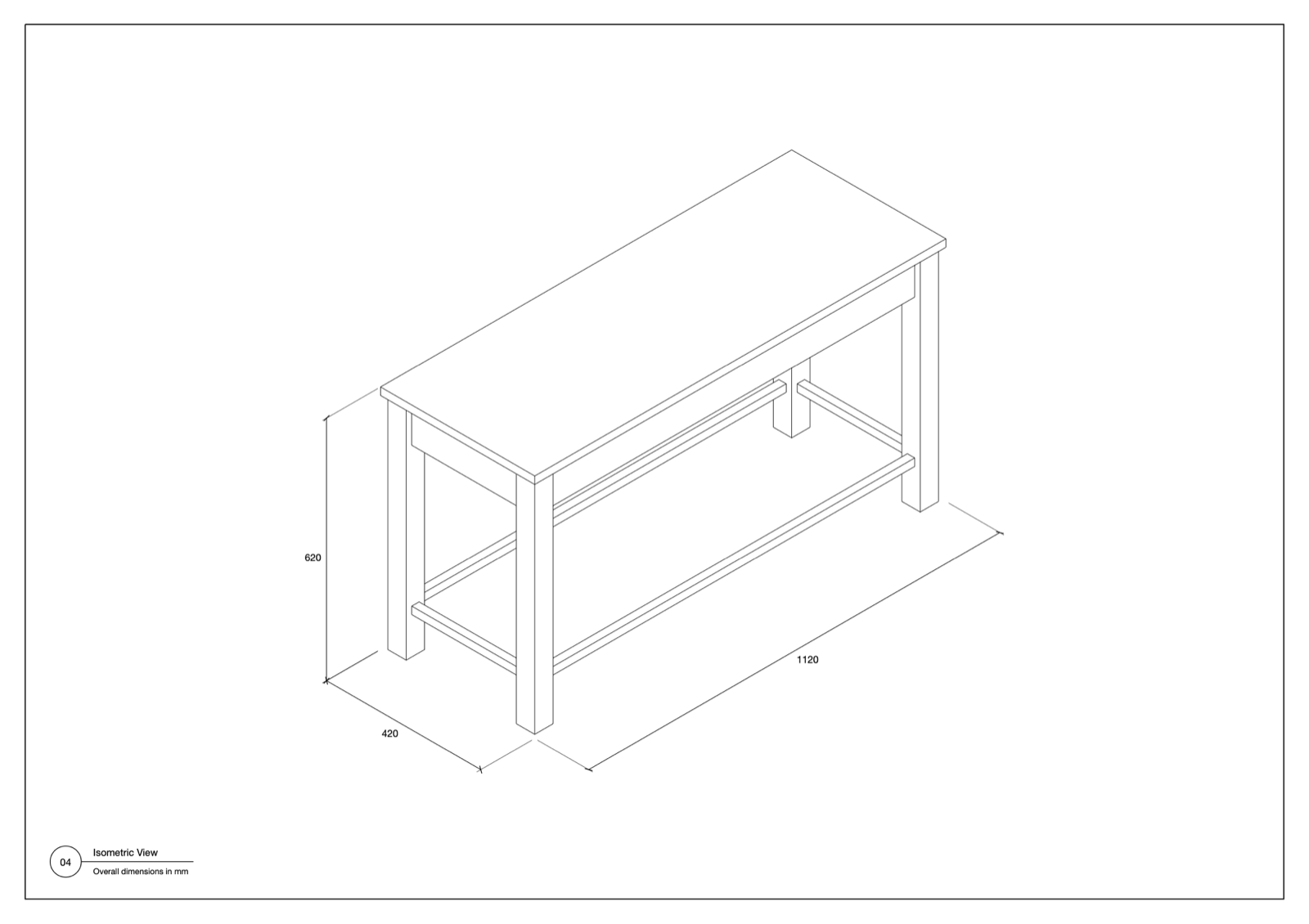
Generate A3 SheetGenerate A3 Sheet
- Two pages: front, top and section views with dimensions, then a large isometric with overall sizes.
- Only what you select: one object, or several as one drawing or one drawing each.
- Scale chosen for you, from a small bench to a long exhibition booth, which gets a wide layout.
- Finds what is easy to miss: part positions as well as sizes, repeated parts labelled once, and tilted panels with their true length and angle.
- Your model stays untouched: all the work happens in a temporary copy.
- Dua halaman: tampak depan, atas, dan potongan berdimensi, lalu isometrik besar dengan ukuran keseluruhan.
- Hanya yang dipilih: satu objek, atau beberapa objek sebagai satu gambar atau satu gambar per objek.
- Skala dipilih otomatis, dari bangku kecil sampai booth pameran panjang yang memakai tata letak lebar.
- Menangkap yang mudah terlewat: posisi bagian selain ukurannya, bagian berulang cukup diberi label sekali, dan panel miring dengan panjang serta sudut sebenarnya.
- Model Anda tidak berubah: semua proses terjadi di salinan sementara.
Live dimensionsDimensi langsung
- Overall Dimension: the outermost group, or the whole selection.
- Object / Face Dimension: the object you click. Option/Ctrl-click measures a face.
- All Dimensions: object, outer group and face together.
- Press Esc to clear the measurement, and Space to leave the tool and go back to Select. Nothing is added to the model.
- Overall Dimension: grup terluar, atau seluruh seleksi.
- Object / Face Dimension: objek yang diklik. Option/Ctrl-klik untuk mengukur face.
- All Dimensions: objek, grup luar, dan face sekaligus.
- Tekan Esc untuk menghapus ukuran, dan Spasi untuk keluar dari tool dan kembali ke Select. Tidak ada yang ditambahkan ke model.
InstallInstalasi
- Download the
.rbzabove. - SketchUp: Extensions › Extension Manager › Install Extension… and choose the
.rbz. - Use Extensions › Quick Dimension, or the toolbar (View › Toolbars). Full guide: Tutorial.
- Unduh file
.rbzdi atas. - Di SketchUp: Extensions › Extension Manager › Install Extension… lalu pilih file
.rbz. - Gunakan Extensions › Quick Dimension, atau toolbar (View › Toolbars). Panduan lengkap: Tutorial.
Generate A3 Sheet currently runs on macOS only, and has been tested on SketchUp 2026 desktop.
Generate A3 Sheet saat ini hanya berjalan di macOS, dan sudah diuji di SketchUp 2026 desktop.
FAQ
"Select at least one group or component""Select at least one group or component"
Generate A3 Sheet only draws what is selected. Select one or more groups or components at the top level of the model, then run it again.Generate A3 Sheet hanya menggambar yang dipilih. Pilih satu atau beberapa grup atau komponen di level teratas model, lalu jalankan lagi.
Does it change my model?Apakah model saya berubah?
No. A temporary copy opens for a few seconds in a window called "QD temporary" and closes by itself.Tidak. Salinan sementara terbuka beberapa detik di jendela bernama "QD temporary" lalu tertutup sendiri.
The model changed. Do the dimensions update?Model berubah. Apakah dimensinya ikut berubah?
No. Dimensions on the sheet are drawn lines and text, so generate the sheet again after a change. You can still edit them by hand in the LayOut file.Tidak. Dimensi di lembar berupa garis dan teks, jadi buat ulang lembarnya setelah model berubah. Dimensi tetap bisa diedit manual di file LayOut.
An object is missing from the sheet.Ada objek yang tidak muncul di lembar.
Objects on a hidden tag are ignored, and flat stand-ins such as a scale person are left out. Parts under 25 mm and products such as cans are drawn but not dimensioned.Objek pada tag tersembunyi diabaikan, dan objek datar seperti figur skala tidak disertakan. Bagian di bawah 25 mm dan produk seperti kaleng tetap digambar tetapi tidak diberi dimensi.
The front view shows the wrong side.Tampak depan menunjukkan sisi yang salah.
A unit running along the green axis is turned so its long side faces the front, and it can end up showing its back. Selecting one unit at a time usually helps.Unit yang memanjang searah sumbu hijau diputar agar sisi panjangnya menghadap depan, dan bisa jadi yang tampil adalah sisi belakangnya. Memilih satu unit sekaligus biasanya membantu.
Can I rely on the sheet for fabrication?Bisakah lembar ini langsung dipakai untuk produksi?
Check it first. Dimensions come from the model, and small modelling slips show up as odd values such as 53.2, so review the sheet before anything is built.Periksa dulu. Dimensi berasal dari model, dan kesalahan kecil saat modeling muncul sebagai angka janggal seperti 53.2, jadi tinjau lembarnya sebelum diproduksi.
Interface language.Bahasa antarmuka.
The extension uses an English interface; the tutorial and this page are available in English and Indonesian.Menu dan dialog extension memakai bahasa Inggris; tutorial dan halaman ini tersedia dalam bahasa Inggris dan Indonesia.
Uninstall.Uninstall.
Extensions › Extension Manager › select the extension › Uninstall.Extensions › Extension Manager › pilih extension › Uninstall.
Contact & bug reportsKontak & laporan bug
Buy me a coffee for IDR 10,000. That's less than a dollar. The plugin is free. The coffee is optional. My wife insisted on this button.